How to read braille (Grade 1 basics)
If you are new, stay on this page long enough to learn three concrete things: how the six dots are numbered, the first ten letters a-j, and why digits 1-0 reuse those same cells after a number sign. That is real Grade 1 material - not just a menu of links.
Finger reading on paper still needs a teacher and time. This page will not certify you. It will get the first decade into your head so the alphabet and practice pages are not a wall of mystery dots.
When to use this page
You are curious about how braille cells work, helping a learner, or prepping a short classroom demo. You want the numbering and a next click, not a 40-page PDF first.
When not
Do not use this to replace a TVI or braille teacher. Do not treat on-screen cells as proof of tactile reading. Do not expect Grade 2 contracted books or medical advice from this site.
The six-dot cell
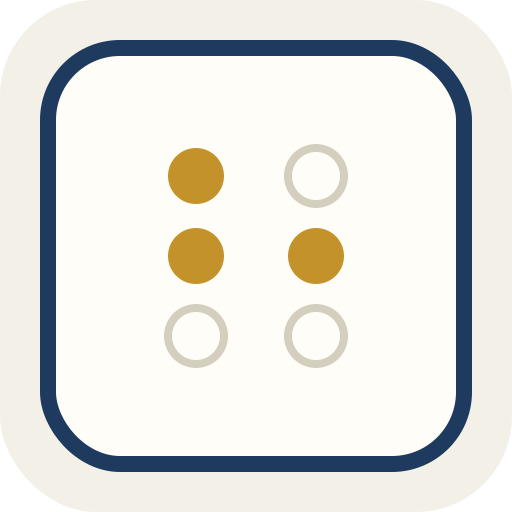
A braille cell is two columns of three dots. Number them 1-2-3 down the left column, 4-5-6 down the right. Every English Grade 1 letter is a fixed combination of those six positions. Capitals and digits use an extra marker cell before the letter or number cells.
Dot numbers (standard)
Left column top to bottom: 1, 2, 3.
Right column top to bottom: 4, 5, 6.
Example: letter a is only dot 1. Letter b is dots 1 and 2. Open the alphabet to tap the rest.
Lines of braille read left to right, one cell after another, the same way English print does on a page. Blank cells are spaces between words.
On this site you mostly see Unicode Braille Patterns - characters that look like cells in supporting fonts. That is useful for study and copy-paste. It is still a screen view, not raised paper under a fingertip.
Lesson 1: the first decade (a-j)
English Grade 1 builds the alphabet in groups. The first group is a-j. Learn these ten cells and you already own the shapes for digits 1-0 - numbers reuse them after a number sign. Cover the print letter with your hand and try to name the cell, then check.
Pattern tip: a-j never use dots 3 or 6. They live in the top four positions. Later letters add lower dots. You do not need that rule today - it just explains why this decade looks "short."
Lesson 2: read a two-letter word
Braille lines go left to right, one cell per letter in Grade 1. The word hi is two cells: h then i.
Say it: "h (1-2-5), i (2-4)." Then type hi in the translator and confirm the same two cells appear.
Lesson 3: digits hitchhike on a-j
Digits are not ten brand-new shapes. In Grade 1, you write the number sign (dots 3-4-5-6, Unicode ⠼), then the letter cell for that digit: 1→a, 2→b, ... 9→i, 0→j. So 3 is number sign + c.
Full 1-0 chart: numbers. Without the number sign, those cells are letters again - that mix-up is the most common beginner mistake.
What you should be able to do after this page
- Point to dots 1-6 on a blank cell without looking at the labels.
- Recognize or rebuild a-j from the decade grid above (even if slowly).
- Explain why 5 looks like e after a number sign.
- Read the two-cell word hi left to right.
You will not yet know k-z, punctuation, or Grade 2. That is fine. Next click the full alphabet, then one round of practice.
What we assume on this page
You are learning with your eyes first, in English Grade 1. Tactile methods, slate writing order, and school house styles can differ. If your teacher numbers dots or writes on a slate differently, follow your teacher for paper work and use this site as a screen check.
A short path that works
- Open the alphabet and tap letters from your name or a word you care about. Say the dot numbers out loud once.
- Convert a short English phrase in the translator. Keep it under a sentence at first.
- If the phrase has ages, rooms, or dates, check numbers so the number sign does not surprise you.
- Run one ten-question round in practice. Wrong answers are normal; the point is to notice which shapes you still mix up.
Gotchas beginners hit
- Eyeballing Unicode is not finger reading. A quiz score here does not mean you can read embossed paper.
- When you write with a slate and stylus, the paper is often flipped - the order you punch can feel mirrored compared with reading the finished page. We mention that; we do not fully simulate slate writing here.
- Digits reuse letter cells a-j after the number sign. Without that marker, those same cells are letters again.
- Some fonts show missing braille as empty boxes ("tofu"). If copy-paste looks blank in another app, try a font that supports Braille Patterns, or use the dots view in the translator.
- Grade 2 books look shorter. If our Grade 1 output seems long next to a library volume, the book is probably contracted - we do not expand or invent those contractions.
Grade 1 vs Grade 2
Grade 1 (uncontracted) is mostly one cell per letter, plus simple markers for capitals and numbers. Grade 2 adds contractions that shorten common words. BrailleLabBase only does Grade 1 so a small web page does not pretend to be a full contracted engine.
If you need Grade 2 production or a formal curriculum, use specialist software and a real course. Use this site when you want a free browser check for uncontracted cells.
Compare next steps on this site
Need every letter under a finger-friendly grid? Use the alphabet. Want to convert a phrase end to end? Use the translator. Want a drill? Use practice. Mapping rules and Worker details live on methodology.
Common questions
Can I learn to read braille from a website alone?
You can learn the shapes and Grade 1 letter cells. Finger reading on paper is slower and needs practice with a teacher or a proper course. Treat this page as a map, not a certificate.
Is looking at Unicode the same as reading by touch?
No. Unicode cells help sighted people and helpers check patterns. Touch reading uses raised dots and a different hand technique. Passing a quiz here does not mean you can read embossed pages.
Why does a printed braille book look shorter than your output?
Many books use Grade 2 contracted braille. Contractions shorten common words. We only output Grade 1, so the same English sentence takes more cells here.
Do you give vision-care or rehab advice?
No. This is a learning and conversion tool. Questions about vision, rehab, or school placement belong with a clinician or a qualified teacher of students with visual impairments (TVI).
Should I start with the alphabet or the translator?
If you do not know any letters yet, start with the alphabet chart and tap a few cells. If you already know a handful of letters, paste a short phrase in the translator and check the ones that look wrong.